
 ca. 30 Minuten
 nach Wunsch auch mit Videocall
Checking every week which products in your webshop are no longer making money, then delisting them by hand? These manual checks take time, are easy to forget, and rarely happen in real time.
This is exactly where AI tools and automation platforms help. Tools like n8n connect your data with other systems and take over routine tasks that would otherwise require a lot of manual work. With minubo, this is particularly powerful: your structured data flows directly into the workflow, and the Co-Analyst explains what is behind it.
In this article, we show you a concrete example: minubo lists products with a negative contribution margin, explains the reasons, and suggests deactivating the products in your webshop. You decide with a single click.
The Use Case: Delisting Unprofitable Products
A product sells well but does not make any money. This often goes unnoticed in day-to-day operations. Revenue looks healthy, but contribution margin 2 is negative.
Our example workflow therefore regularly checks which products had a negative contribution margin 2 over the last 7 days. For every product it finds, it gives you three things:
- an explanation of why the product is currently unprofitable
- the relevant information from your webshop
- an email to support your decision, with a single click to delist the product
The reasons can vary considerably and may include high transaction costs or a selling price below the cost of goods sold. The Co-Analyst tells you the reason so you do not have to check each product individually.
The following video is a good starting point for getting a better understanding of the output you can expect.
How the Workflow Works
The workflow consists of several steps that run one after another. You do not have to build it yourself. However, the steps help you understand the principle.
Step 1: minubo identifies unprofitable products. Segmentation in minubo finds all products with a negative contribution margin 2 over the last 7 days. The result is made available as a feed.
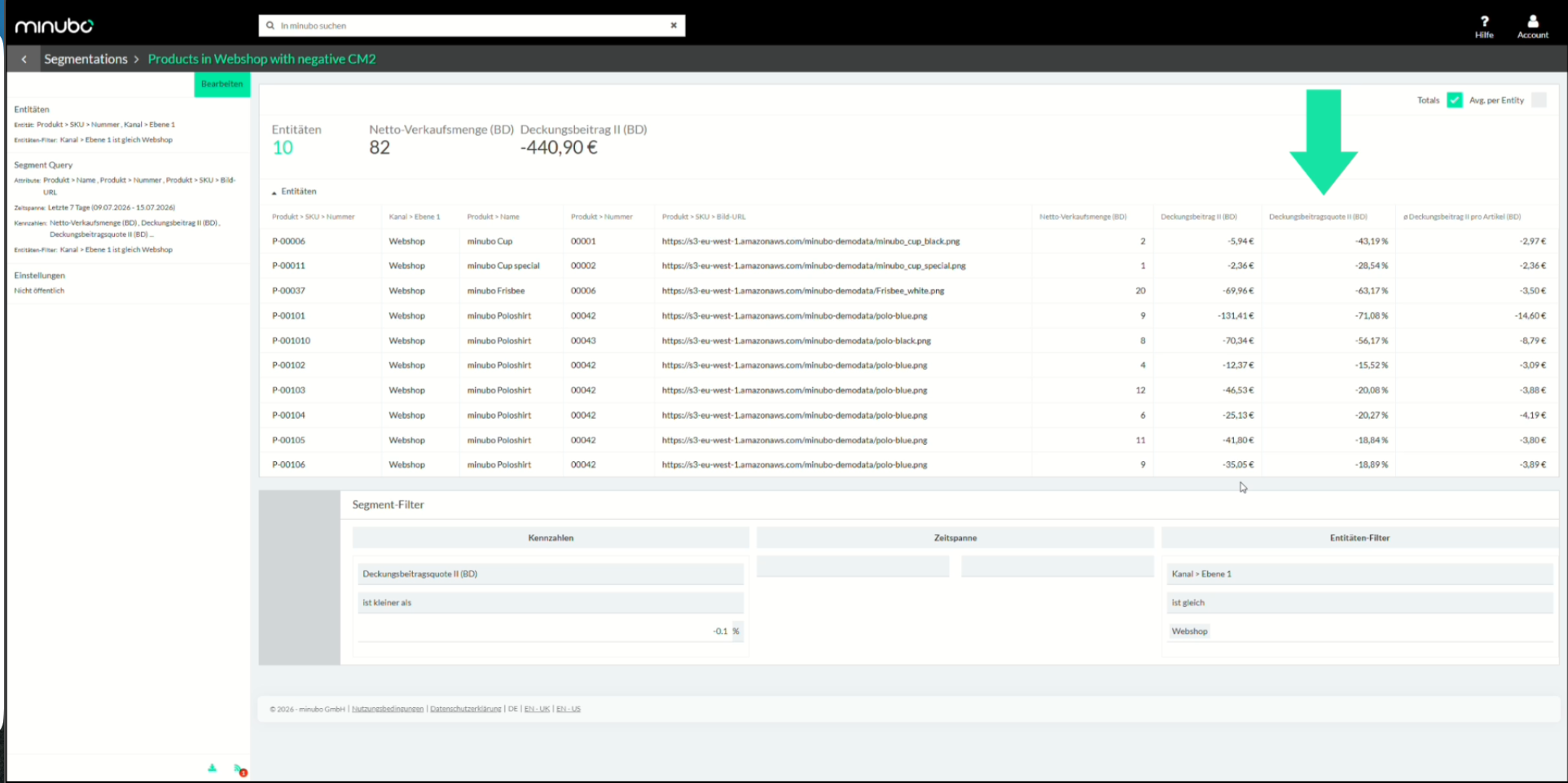
Step 2: The data goes to n8n. Your minubo data automatically enters the workflow via a feed and MCP. No manual download or upload is needed in between.
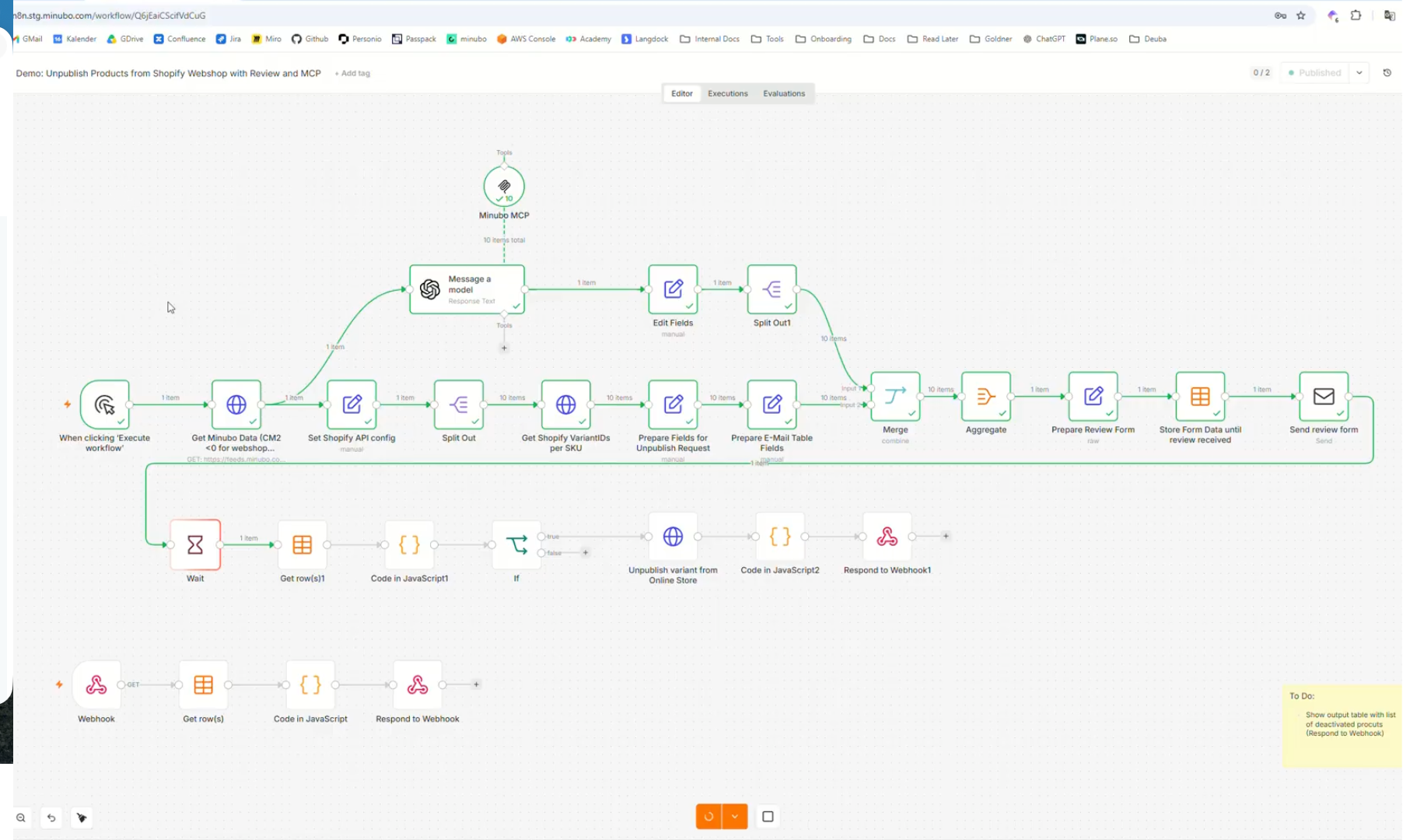
Step 3: The Co-Analyst explains the reasons. The AI accesses your minubo data directly via MCP. This produces a well-founded explanation for each product. It is more than a fixed text template.
Step 4: Shopify information is added. The workflow retrieves the relevant product data from your webshop, for example through the Shopify integration.
Step 5: The email provides the basis for your decision. YYou receive a list of the affected products, along with an explanation for each one. A form shows you what you can do: delist them or not.
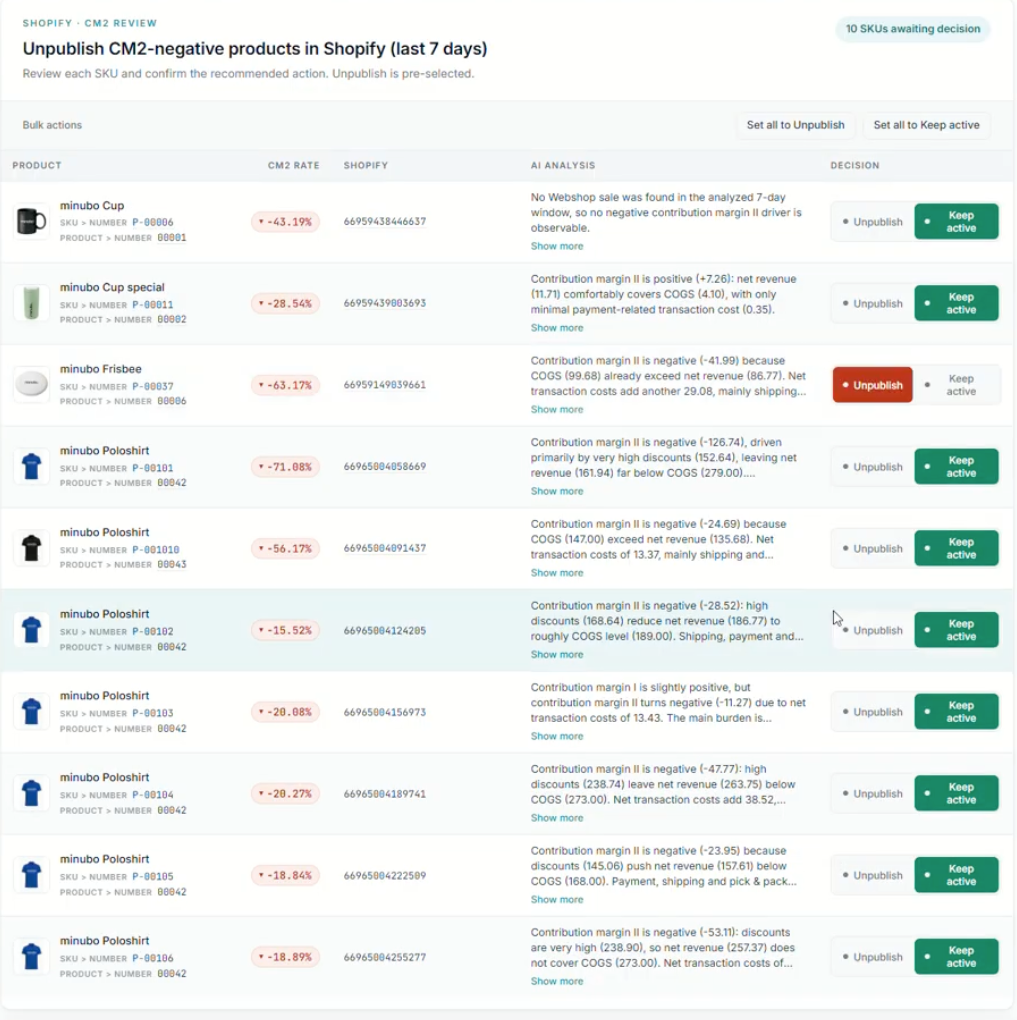
Step 6: One click, and the product is deactivated. You decide. After that, the rest runs automatically. Shortly afterward, the product is no longer visible in your webshop.
Why This Workflow Is More Than a One-Off
This use case is an example, not a ready-made recipe. The principle works for any system that has an interface (API). This includes webshops, marketplaces, and marketing tools.
n8n is also just one possible tool. There are alternatives such as Make.com.
The key point is that it is not just the integration that scales, but also the intelligence behind it. The explanations are generated directly from your minubo data via MCP. The same integration can be used for many other questions you can already answer in minubo today.
What You Need
You can automate almost anything. But reliable results require a solid foundation. Three things matter here:
- Data foundation: Your data must be accurate, complete, and up to date.
- Semantics: You need clear definitions. What exactly does “unprofitable” mean for you? At what value is a product considered negative?
- Guardrails: You set the rules. They determine what the AI is allowed to do on its own and where a human makes the decision.
In this example, a human always makes the final decision. The AI suggests; you confirm.
Thinking Ahead: What Else Is Possible?
The workflow is deliberately kept simple. You can extend it or use it as a template for other scenarios. Here are a few ideas:
- Slack messages instead of, or in addition to, emails
- Other triggers, such as new orders or tickets
- Custom calculations and filters in the workflow, for example for metrics that cannot be represented directly through segmentation
- Additional minubo data, such as revenue metrics, return rates, or marketing data
- Low-stock alerts for products that sell frequently
Try it out and discover which manual tasks in your day-to-day work you can automate with minubo and n8n.
Conclusion: What You Analyze, You Can Also Control
Whatever you can analyze with minubo, you can also pass on automatically to other systems. This puts you in control of what happens in your tools.
Which of your business questions would you like to turn into automated action?
While you think about your answer, it is worth trying the minubo Co-Analyst: your personal AI analyst. Ask your question in everyday language and get the answer in chat.

Frequently Asked Questions About Automation with minubo and n8n
What is n8n? n8n is an automation tool. It connects different systems and carries out steps automatically, such as retrieving and analyzing data and sending an email.
Do I need programming skills? No. The workflow can be built from a template and adapted.
Which systems can I connect? Anything with an interface (API), such as webshops, marketplaces, or marketing tools.
Does the AI decide on its own whether a product is delisted? No. The AI explains and suggests. You decide with a click.