
 ca. 30 Minuten
 nach Wunsch auch mit Videocall
How much revenue will next quarter bring? And how will your Contribution Margin 1 develop if you run a major campaign in the fall? Questions like these need a forecast. A good forecast takes work: gathering data, spotting outliers, making assumptions, and getting the calculations right.
The minubo Co-Analyst can help you do this with a Playbook. A Playbook is a ready-made analysis workflow for a typical business question. The Forecasting Playbook contains detailed analysis instructions that run in the background. You do not have to write them yourself.
The Co-Analyst asks follow-up questions when needed, so your business knowledge informs the analysis. You then refine the result in the chat.
In this article, we walk you through the Forecasting Playbook for revenue and Contribution Margin 1: what you get, how the workflow works, and how you refine the forecast through conversation.
What Your Forecast Looks Like
To understand what the playbook does for you and what output you can expect, the following video is a good starting point. It's also worth taking a look at the sample HTML report we've generated for you to view on the demo data page.
PLaybook Video
Output example of the playbook
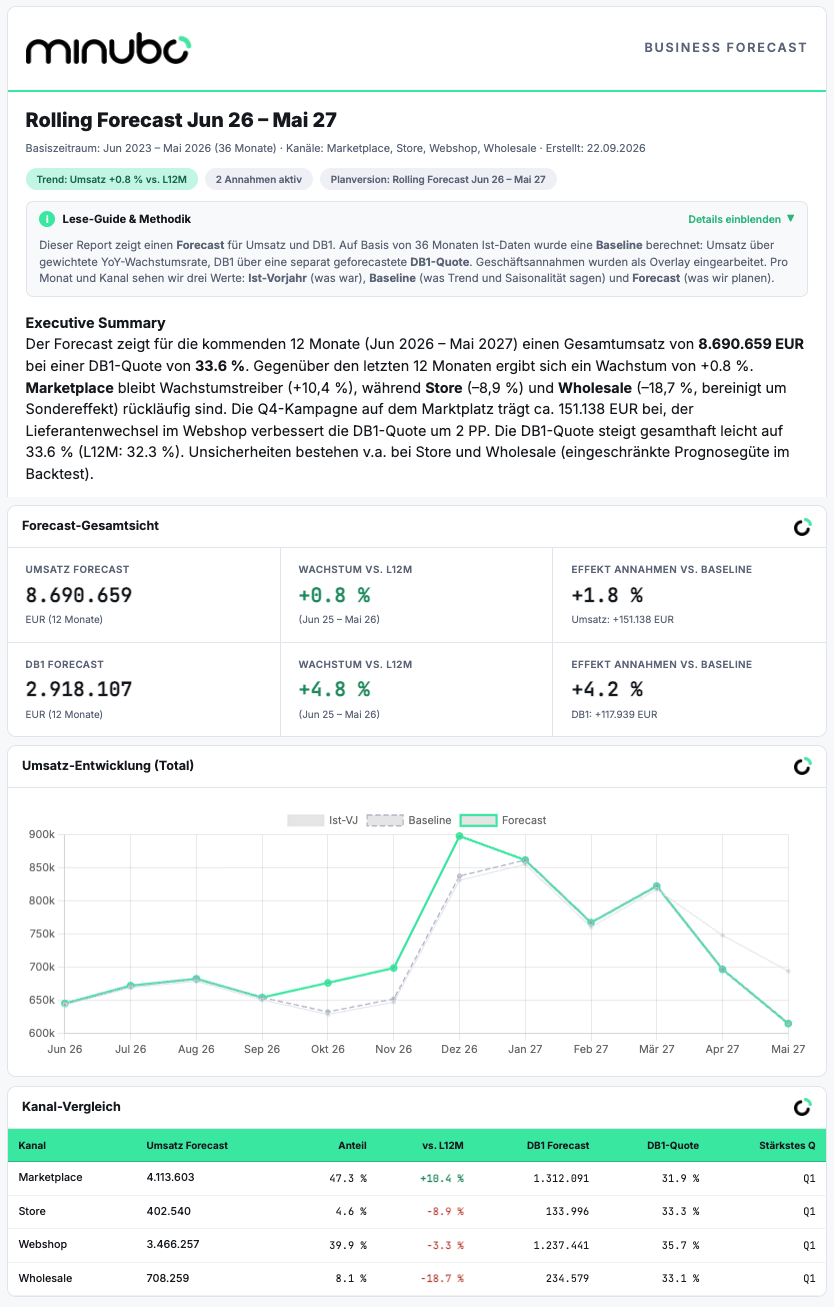
The Playbook delivers your initial forecast as an interactive HTML report in a consistent, reproducible format, populated with insights from your data.
Get an overview of what you can expect with our sample demo report.
 ⚠️ The screenshot only shows parts of the report – for the full view please click here.
The report includes:
- A forecast for revenue and Contribution Margin 1- A breakdown by month and sales channel
- An assessment of how well each channel can be forecast
- Methodology details and tables that you can expand as needed
Notes:The HTML report has been rendered here as an image – unfortunately, this slightly degrades the layout quality.
The real HTML report is interactive – the section on methodology details, the detailed tables on revenue and contribution margin 1 per month and channel, as well as the classification of the forecast accuracy per channel, including background information on how the values are derived, only become visible after clicking on "Show details".
Important note on model selection: Forecasts require a capable AI model. Weaker models are not suitable. A run takes approximately 3 to 7 minutes, depending on the model and scope.
Generate Your Initial Forecast
To generate your forecast, brief the Co-Analyst, review unusual patterns in your historical data, and assess the resulting forecast. You can then refine and extend it in the chat.
Step 1: Provide Your Briefing
Start by describing what you want to forecast. A single sentence or a few bullet points will do. Include:
- Metric: Revenue, Contribution Margin 1, or both
- Channels: For example, online channels only
- Time period: For example, the next 12 months or the next full calendar year
- Assumptions: For example, a large Black Week campaign with an expected revenue uplift, or a supplier switch expected to improve your margin
Use whichever format works for you. For example:
“Please create a forecast for revenue and Contribution Margin 1. Assumptions: Q4 marketplace campaign with a 15% revenue uplift; webshop Contribution Margin 1 ratio up by 2 percentage points due to a supplier switch, effective immediately.”
If information is missing, such as assumptions you have not yet specified, the Playbook instructs the LLM to ask follow-up questions. You can start with your request and work through the process step by step.
Step 2: Review Outliers and Structural Breaks
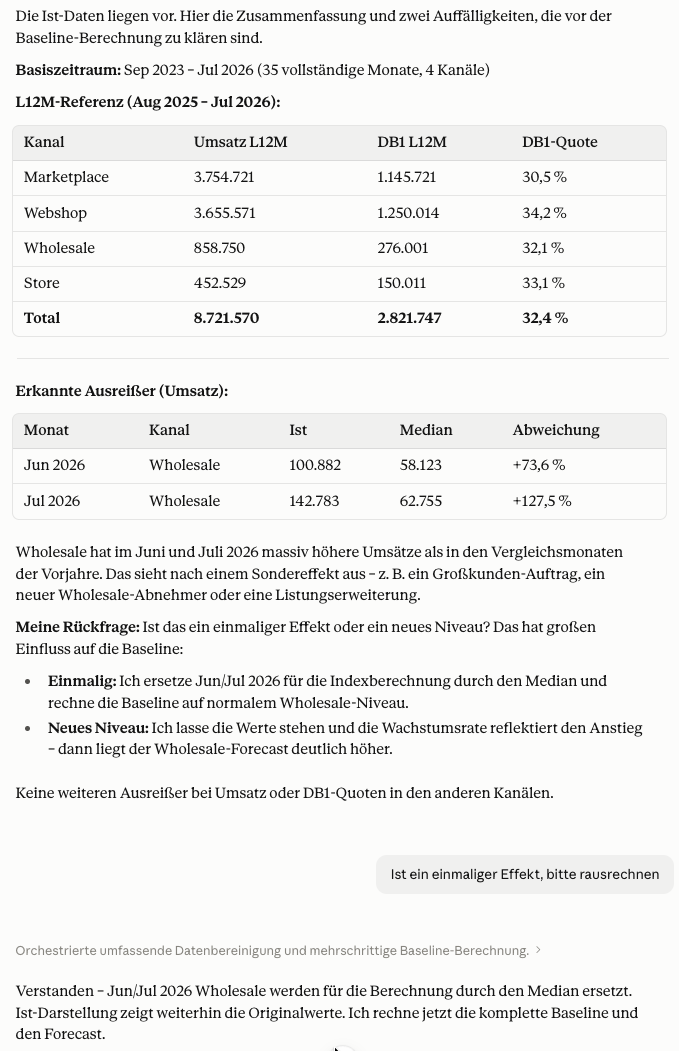 Before generating the forecast, the Co-Analyst builds time series from your actual data for the last 36 months. It then shows you any outliers or structural breaks it has identified. Together, you decide how to handle them. This matters because unusual months can distort a forecast.
Example 1: Individual outlier months. Two months in the Wholesale channel have unusually high revenue. The Co-Analyst asks whether these were one-off effects, such as a particularly large customer order, or a recurring pattern, perhaps because that customer orders every year. Depending on your answer, it smooths the values or includes the pattern in the forecast.
Example 2: Disproportionate growth. Marketplace A has grown faster than the other channels over the last four months. The Co-Analyst asks whether a one-off factor is responsible, such as increased marketing spend that you will not maintain.
Alternatively, have you made a strategic decision that will support this growth over the longer term? Your answer determines whether the Co-Analyst removes the effect or keeps it in the forecast.
After a few minutes, you receive your forecast as an HTML file in the chat.
Step 3: Assess Forecast Quality
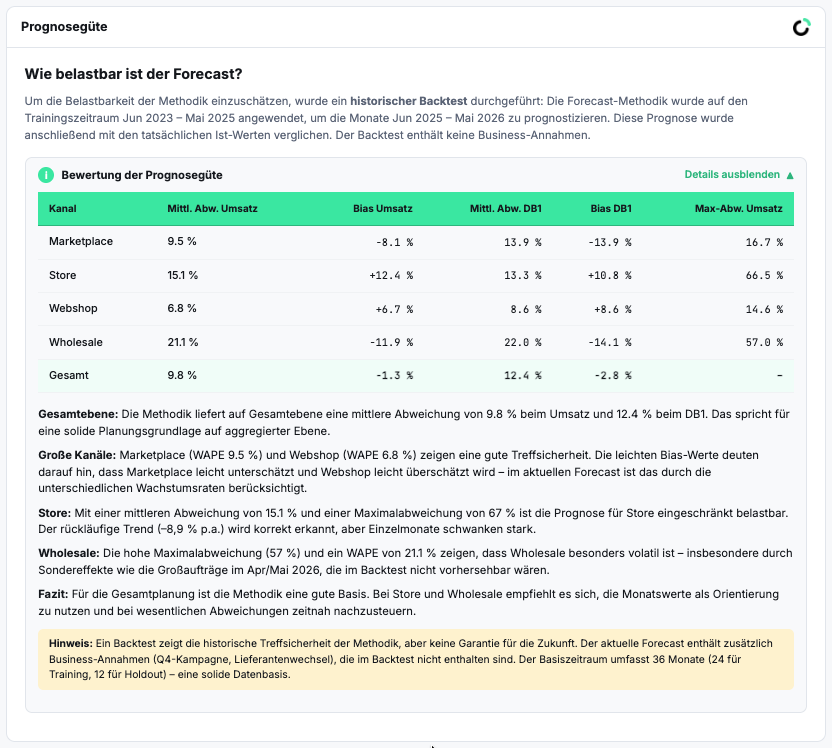 The report includes a channel-level forecast-quality assessment at the bottom, helping you judge how to use the results. The greater a channel’s historical fluctuations, the harder it is to forecast. Understanding these uncertainties helps you decide what to do next.
For example, your assessment might look like this:
-
Online channels, including your webshop and marketplaces: Forecast quality is high. You continue working with the forecast figures.
-
Store and Wholesale: The forecasts are less reliable because both channels have fluctuated considerably in the past. Here, you bring your own judgment into the process:
- Wholesale: In conversation with the Co-Analyst, you set a flat baseline at the prior-year level and add a fixed growth rate. You know your B2B customer relationships better than any time series does.
- Store: You give the Co-Analyst more background on the channel’s history. Together, you work out how to smooth the trajectory. This does not automatically improve forecast quality, but your business knowledge makes the forecast more meaningful.
These refinements give you a more useful second iteration of your forecast.
Step 4: Extend Your Forecast
You can continue developing your forecast in the chat by requesting adjustments, exploring specific areas, or comparing scenarios.
Add a chart: Ask the Co-Analyst to show trends for key product categories by channel.
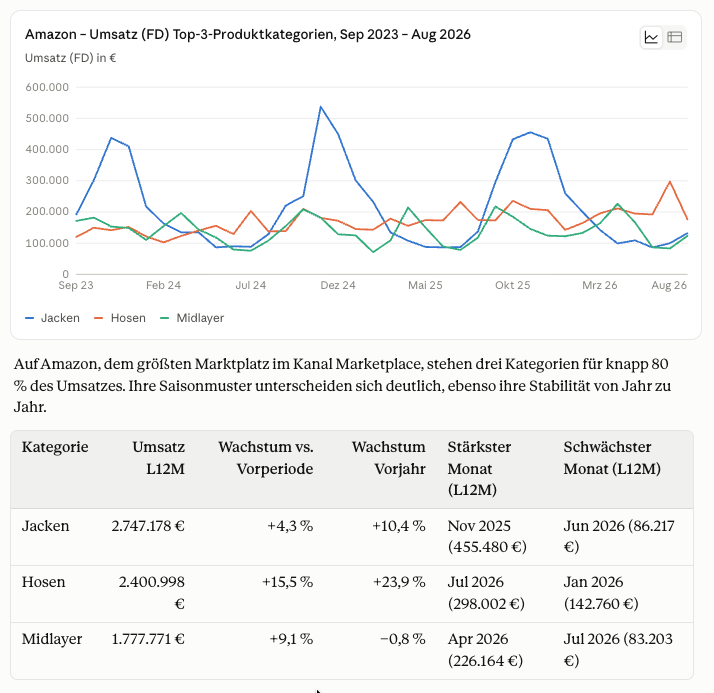
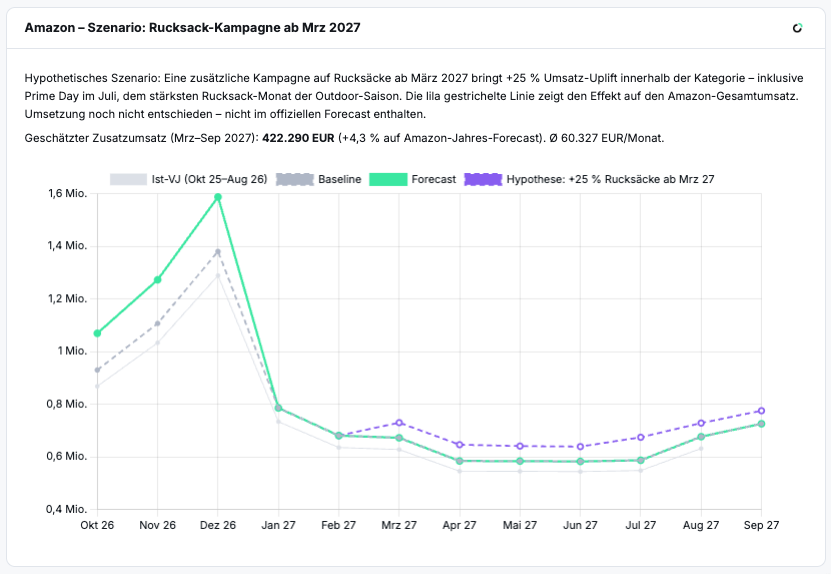
Test a hypothesis: You plan to promote an important category with a campaign. What effect would that have?
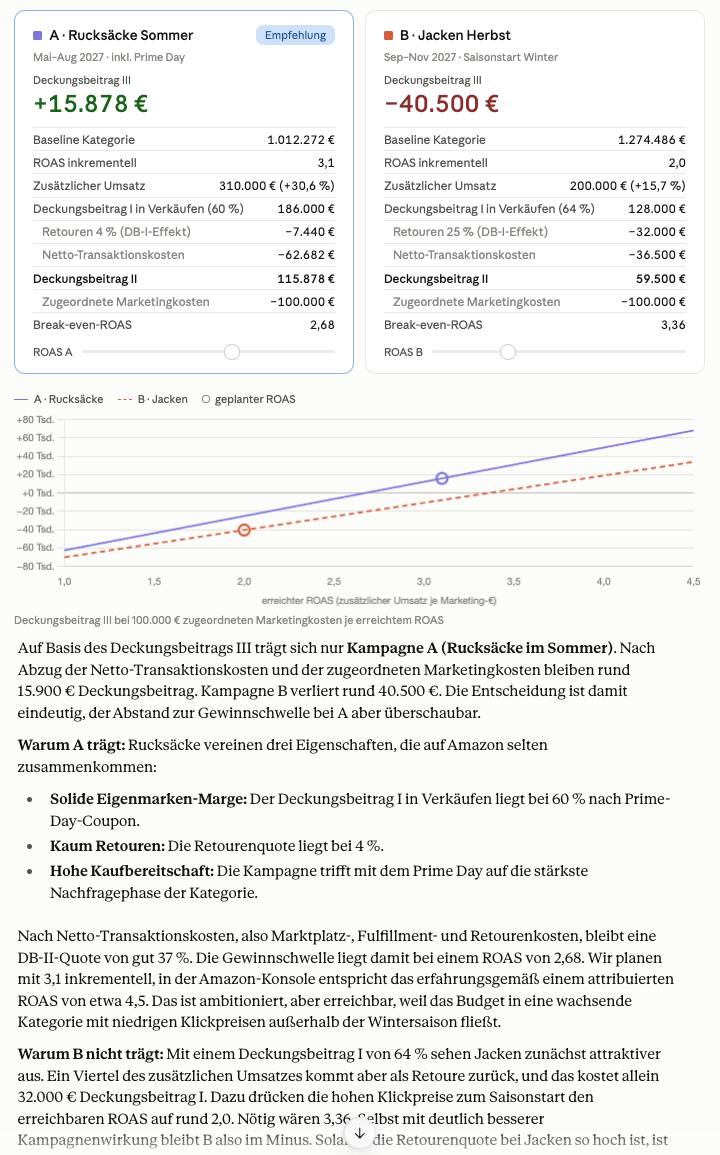
Compare scenarios: You need to allocate marketing budget and want to know which seasonal campaign would deliver more. The Co-Analyst compares the scenarios and shows how they change the forecast.
Forecasting in Your Day-to-Day Work
The Forecasting Playbook helps you create a forecast tailored to your assumptions, for next year’s planning or a projection of the next three months. You can incorporate scenarios and discuss their implications in the chat.
Try it out. And if you know colleagues who would find it useful, share the tip with them.

Frequently Asked Questions About the Forecasting Playbook
What Does the Forecasting Playbook Do?
It creates a forecast in the chat, asks about your assumptions, and checks your data for outliers and structural breaks.
What Output Do I Get?
You receive an HTML report containing the forecast, a breakdown by month and channel, and an assessment of forecast quality.
How Long Does a Forecast Take?
A run takes approximately 3 to 7 minutes, depending on the model and the scope of the forecast.
Can I Adjust the Forecast Afterward?
Yes. You can change assumptions in the chat, refine individual channels, compare scenarios, or request additional analyses.